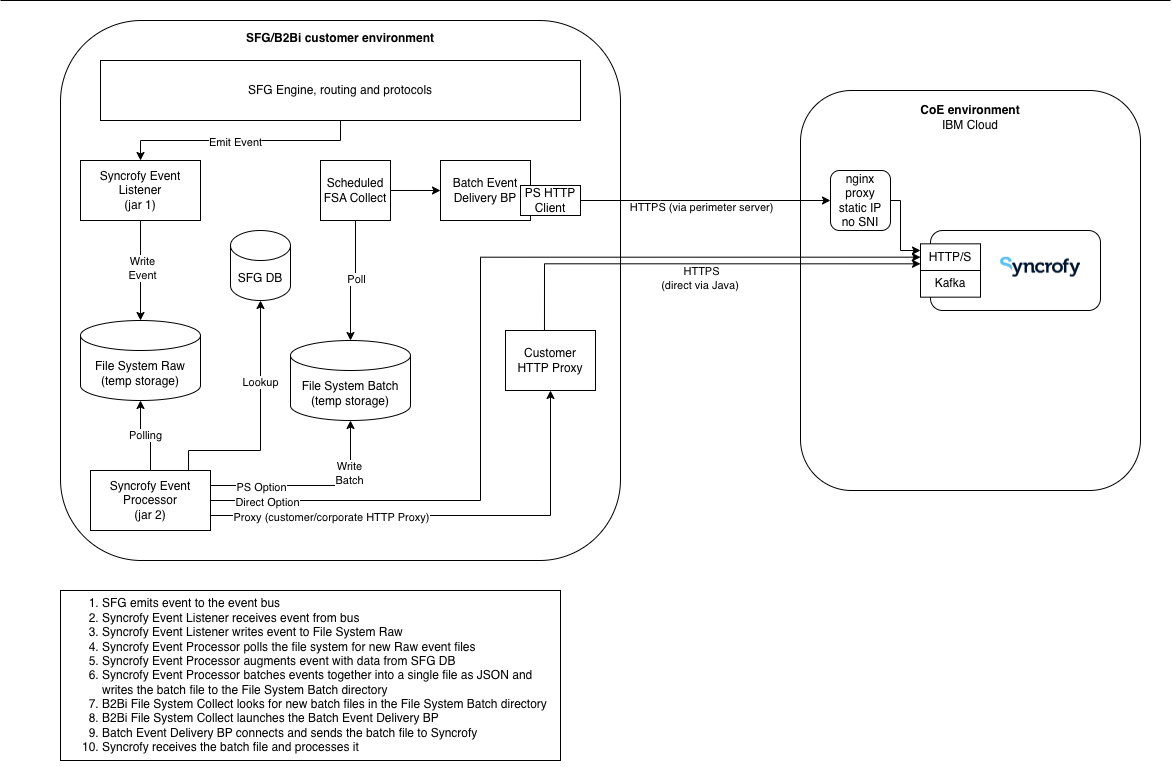
The SFG adapter is used to connect SFG to Syncrofy by capturing native events in SFG, enriching those events with additional data from the SFG database and uploading the event data to Syncrofy as JSON.
There are two parts to the SFG Adapter:
- Syncrofy Event Listener - The Event Listener runs inside of B2Bi/SFG and listens for events on the internal event bus. This jar must be installed on each node in the cluster.
- Syncrofy Event Processor - The Event Process runs outside of B2Bi/SFG and receives events from the Event Listener via filesystem. The filesystem can be cross mounted or kept local. The Event Processor is responsible for enriching events, converting them to JSON, batching them up and delivering them to Syncrofy.
The Event Processor can deliver events in two different modes.
- Direct HTTPS upload - The Event Processor directly connect to the Syncrofy HTTPS endpoint and uploads the event batch files.
- Indirect upload - The Event Processor writes the batch files to a directory for an external process to deliver. This can be useful for installations where direct external connectivity is restricted.
- Proxy upload - The Event Processor connects to a corporate HTTPS proxy to upload to the event batch files.
¶ Installation
Start by creating an install directory /opt/coe, cd to that directory and unzip the SyncrofySFGAdapter.zip.
Set a shell variable to point to this location:
export COE_Syncrofy_Properties_Location=/opt/coe
¶ Edit applications.properties
Database and driver information
Get this information from your B2Bi/SFG install.
spring.datasource.url=jdbc:oracle:thin:@localhost:1521:MFTDB
spring.datasource.username=B2BDBA
spring.datasource.password=mypassword
spring.datasource.driver-class-name=oracle.jdbc.OracleDriver
Event source information
This is information about the event generator. Set the name to include test/prod and the node ID. The URL can be the URL to SFG.
Let's say you have test and prod SFG and each one has 3 nodes in the cluster. You would use the NAME to say "SFG TEST Node 1" or "SFG Prod Node 3". The URL should correspond to that node and point to the SFG admin login URL. All events from that node have that same info. It is unrelated to the protocol transfer happening.
EVENT_SOURCE_NAME = Syncrofy SFG Production Node1
EVENT_SOURCE_URL  = http://mysfg.com
EVENT_SOURCE_TYPE = SFG
Upload URL and token
Get this informatiom from Syncrofy.
For direct HTTPS upload, set
upload.http.enabled=true
upload.http.url=https://events.test.syncrofy.com/events/upload/97b47e4d-578a-41cd-a396-ce8fc94c869f/production
upload.http.token=xxxxxx-xxxxxx-xxxxxx-xxxxxxx
For indirect HTTP upload, set:
upload.http.enabled=false
Adjust batching as needed. Smaller batches for direct and potentially larger batches for indirect.
Batch.Count=100
¶ Install the Event Handler
Add the Event Handler with install3rdParty.sh, from the B2Bi/SFG install directory:
bin/install3rdParty.sh cust_listeners syncrofy_mft_event_handler -j /opt/coe/syncrofy-mft-event-handler-1.0.jar
The jar file will be put into:
/opt/ibm/b2bi/jar/cust_listeners/syncrofy_mft_event_handler
and added to dynamicclasspath.cfg
Edit listenerStartup.properties.in to add the following
• Check dynamic class path for the new jar
## PROPERTY_START
## PROPERTY_NAME: Listener.Class.coe
## PROPERTY_TYPE: String
## PROPERTY_DESCRIPTION
## Sends SFG info to Syncrofy
Listener.Class.coe.2=com.coenterprise.syncrofy.events.SyncrofyMFTEventHandler
## PROPERTY_END
The variable name ( ex: Listener.Class.coe.2 ) needs to be a unique identifier. When adding another listener, increment the number.
Stop and restart B2Bi/SFG by running hardstop.sh, setupfiles.sh, run.sh.
¶ Install the Event Processor
Verify you see syncrofy-mft-event-processor-1.0.jar in the directory.
Make the database's JDBC driver jar available to the Event Processor by placing the jar in BOOT-INF/lib/ (e.g. BOOT-INF/lib/ojdbc8.jar) and run:
jar u0f syncrofy-mft-event-processor-1.0.jar BOOT-INF/lib/ojdbc8.jar
this will make the JDBC driver available to the processor.
¶ Start/stop the Event Processor
From the /opt/coe directory, run sh syncrofyEventProcessor.sh start or sh syncrofyEventProcessor.sh stop
The event processor should be setup to start when the system restarts. This is left as an exercise for the reader.
¶ Indirect Delivery
If you are using indirect delivery, the Event Processor will place files in the event_delivery directory. This is a handoff point to whatever is doing the delivery. You may need to setup BPs and schedules inside of SFG to pick up those files and delivery them.
¶ Troubleshooting
- Check the
visibility.logandnoapp.logfor failures in the Event Listener. - Check
logs/syncrofy_mft_event_processor.logfor failures in the Event Processor. - The Event Listener writes files to the event_output directory. Check this directory for files to verify the Event Listener is working.
- The Event Processor reads files form the event_output directory after they have aged for 60 seconds.
- For direct upload mode, the Event Processor will batch events and write them to the event_upload directory and then upload them to the specified endpoint.
- For indirect upload mode, the Event Processor will batch events and write them to the event_delivery directory. The system delivering these files is responsible for deleting them.
- A copy of the uploaded batch file is kept in event_history.
¶ Event Ingest Endpoints
The event upload endpoint is hosted in IBM cloud at https://events.prod.syncrofy.com (port 443). Client SNA support is required as well as the use of the Host header. This endpoints dynamic DNS resolution. IP ranges can not be provided for this endpoint.
If a static IP is needed or non-SNA TLS is required, a static proxy is available at https://nginx-api.prod.syncrofy.com (port 443) that resolves to IP 52.118.189.238.